DHV Series - How-To Guide
Quiet calls and echo come from one level and one switch, not from a dead microphone.
Callers cannot hear you, or they hear themselves back? The MIC gain row under Device, Sound sets how hard the built-in microphone works, and Back MIC switch in the Factory menu moves the input to an external mic.
0:39 - the MIC gain slider, then the Back MIC switch in the Factory list. Open the clip on YouTube if the embed is blocked.
Note: As our products are continuously upgraded, the interface on your unit may look slightly different. Please select the corresponding function according to your own model.
Quick answer
Open Settings, tap Device, then Sound, scroll down and tap MIC gain. The slider runs from 1 to 7; a level that is too low makes you faint, a level that is too high picks up the speakers and echoes back. Then open Factory in the same list, enter the factory code, and set Back MIC switch to Back MIC on if the car has an external microphone.
A DHV unit that plays music perfectly can still be unusable on a call, and the two complaints we get most often look like opposites: the other end says you are very quiet, or the other end hears its own voice back a fraction of a second late. Both come from the same place - how much signal the microphone path carries, and which microphone is feeding it.
Too little gain. The built-in microphone sits behind a small hole in the front panel, a long way from the driver's mouth. Set the level low and the far end gets a thin, distant voice; nothing is broken, the signal is simply sent too quietly.
Too much gain. Turn the same level up and the microphone starts to hear the car: door speakers, subwoofer, road. Because the speakers are playing the caller's voice, that voice goes back in and returns as echo, and past a point the loop becomes a whistle. Raising the gain to cure a quiet call is the most common way to create one.
The wrong microphone. If the car has an external capsule on the A-pillar or near the mirror, the unit has to be told to listen to it - out of the box the firmware listens to the built-in one. With an external microphone fitted and the menu still on the internal one, the capsule does nothing and the call sounds exactly as if it were not there.
Neither setting needs the dashboard opened, and both survive a reboot.
The gain row is not in the Factory menu, which is where most owners look first. It sits on the Sound page, and it is the last row of that page.
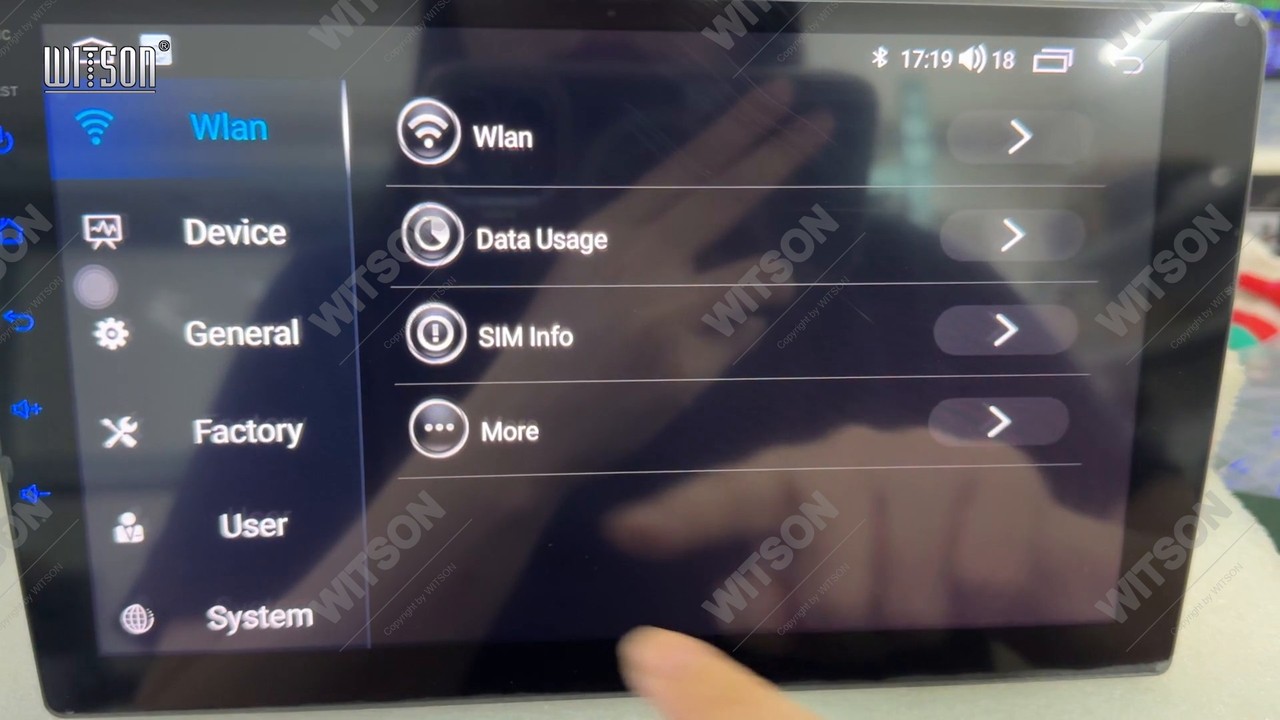
From the home screen, tap Settings in the app dock. The left column reads Wlan, Device, General, Factory, User and System; the right side shows the entries of whichever one is highlighted.
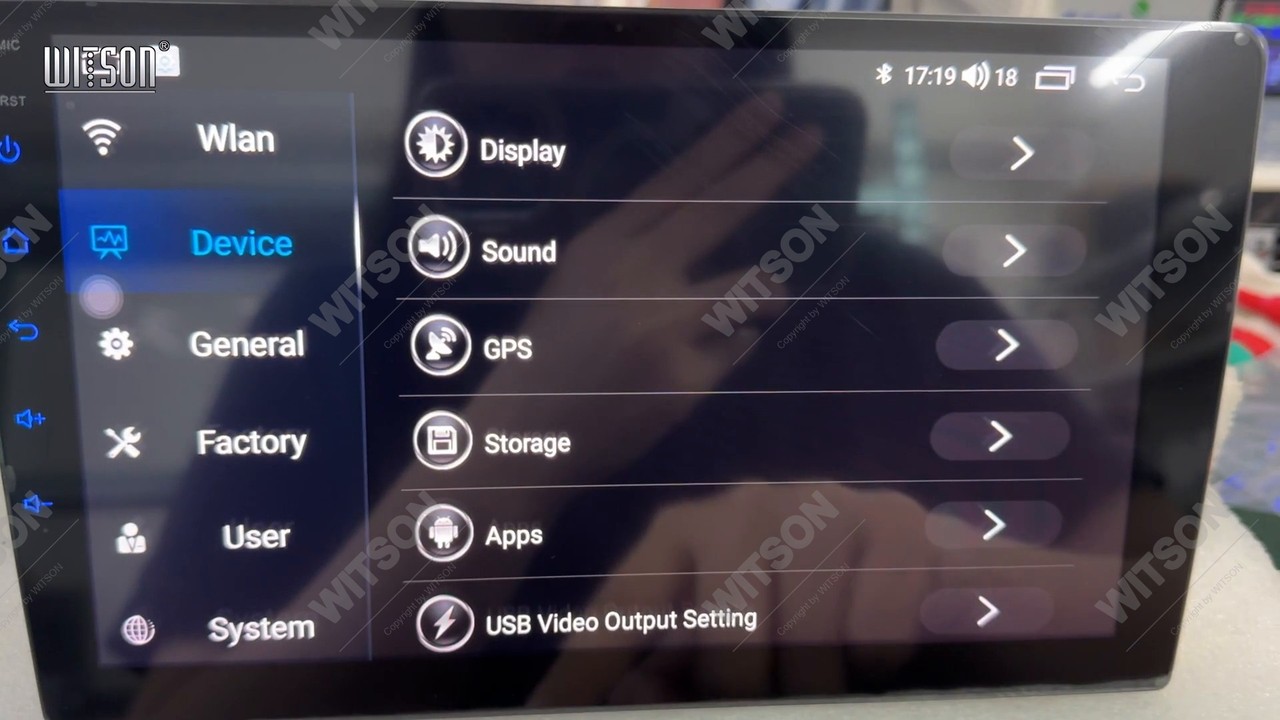
Tap Device, the second entry in the left column. The page lists Display, Sound, GPS, Storage, Apps and USB Video Output Setting. Tap Sound, the second row.
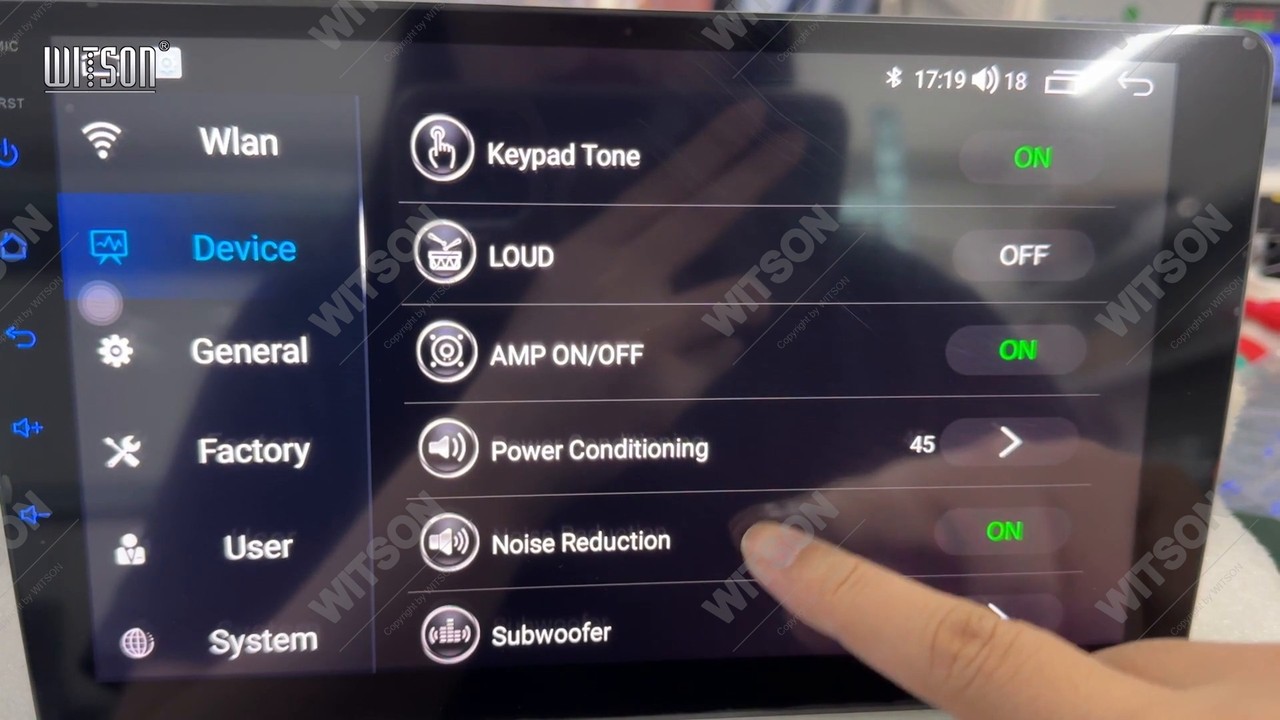
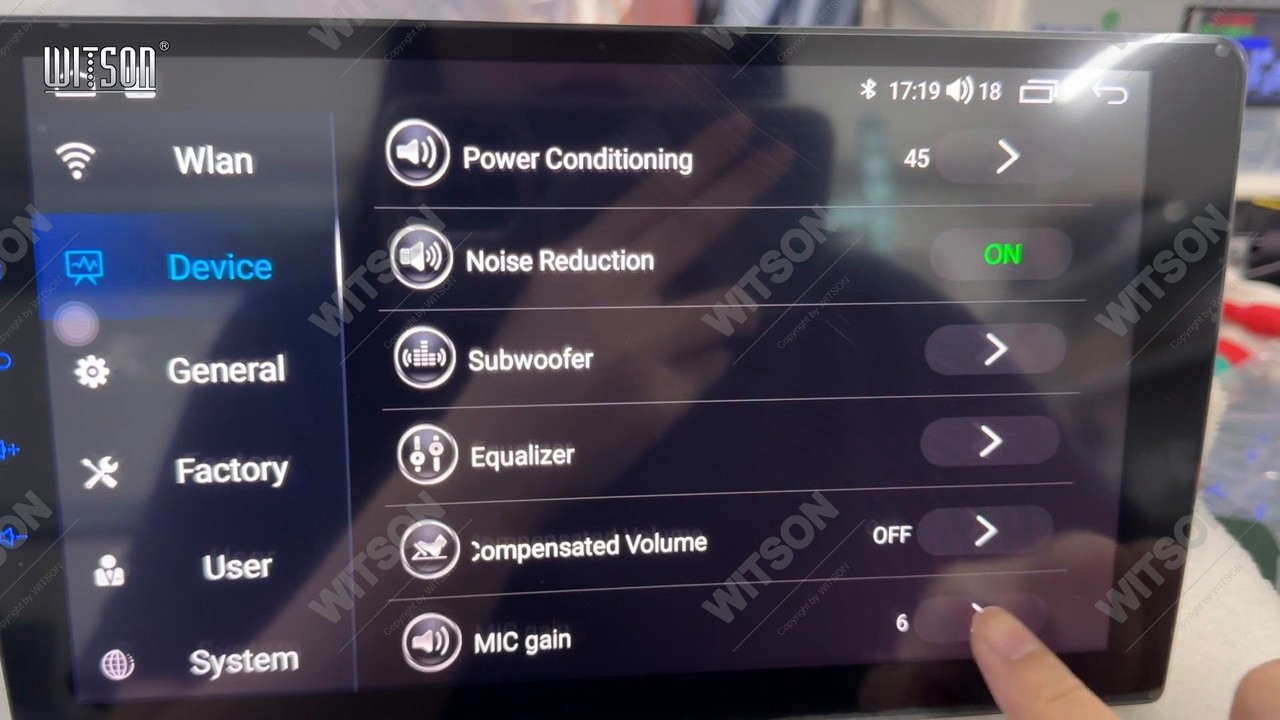
From the top the page reads Keypad Tone, LOUD, AMP ON/OFF, Power Conditioning, Noise Reduction, Subwoofer, Equalizer, Speed Compensated Volume and finally MIC gain. On the bench unit in the clip, AMP ON/OFF is green ON, Power Conditioning stands at 45 and Noise Reduction is on. Scroll the list until MIC gain appears.
Tapping MIC gain opens a small panel with a slider scaled 1 to 7. The unit in our clip arrives at 6 and is taken down to 4. Drag the handle, then tap outside the panel to close it; there is no save button - the value is written as you release, and the row keeps showing the current number.
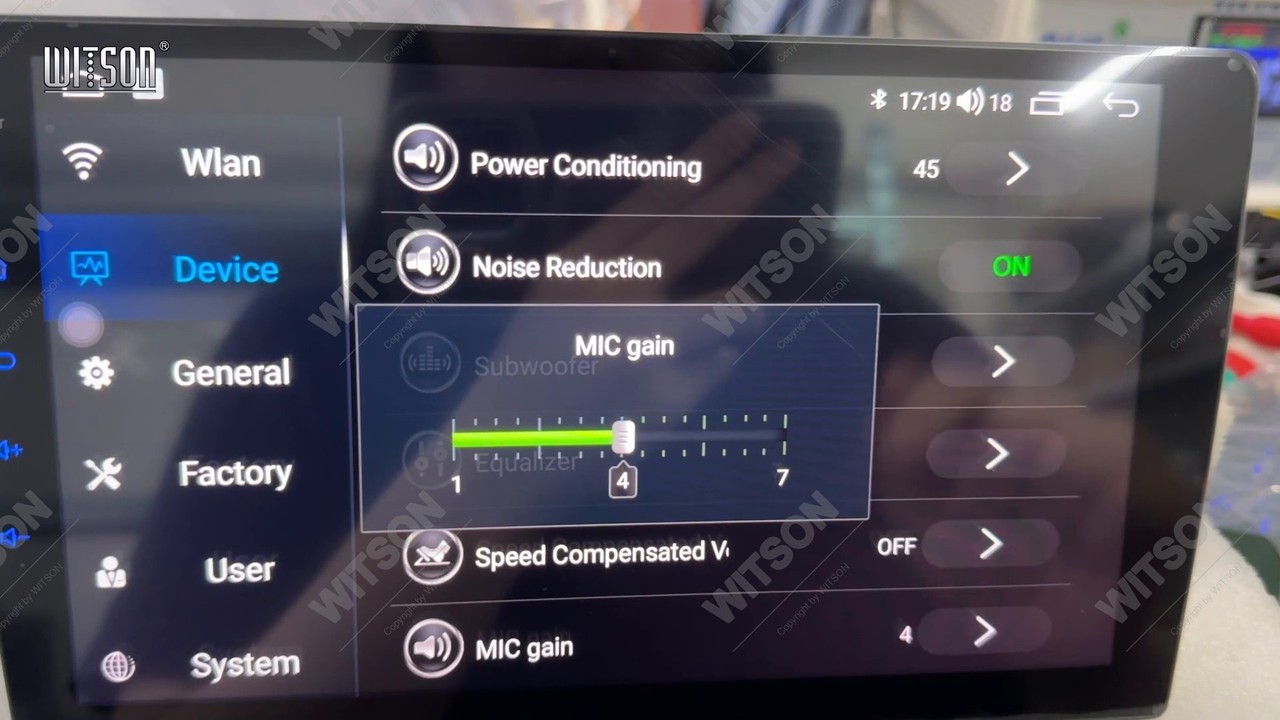
Move one step at a time and test with a real call between steps: the difference between 4 and 6 is easy to hear at the other end and hard to judge from the driver's seat. If the complaint is echo rather than volume, the useful direction is down - a lower gain makes the microphone deaf to the speakers, which is what removes the return path.
An external microphone is only used when the unit is told to. The row that decides it is Back MIC switch, behind the Factory password.
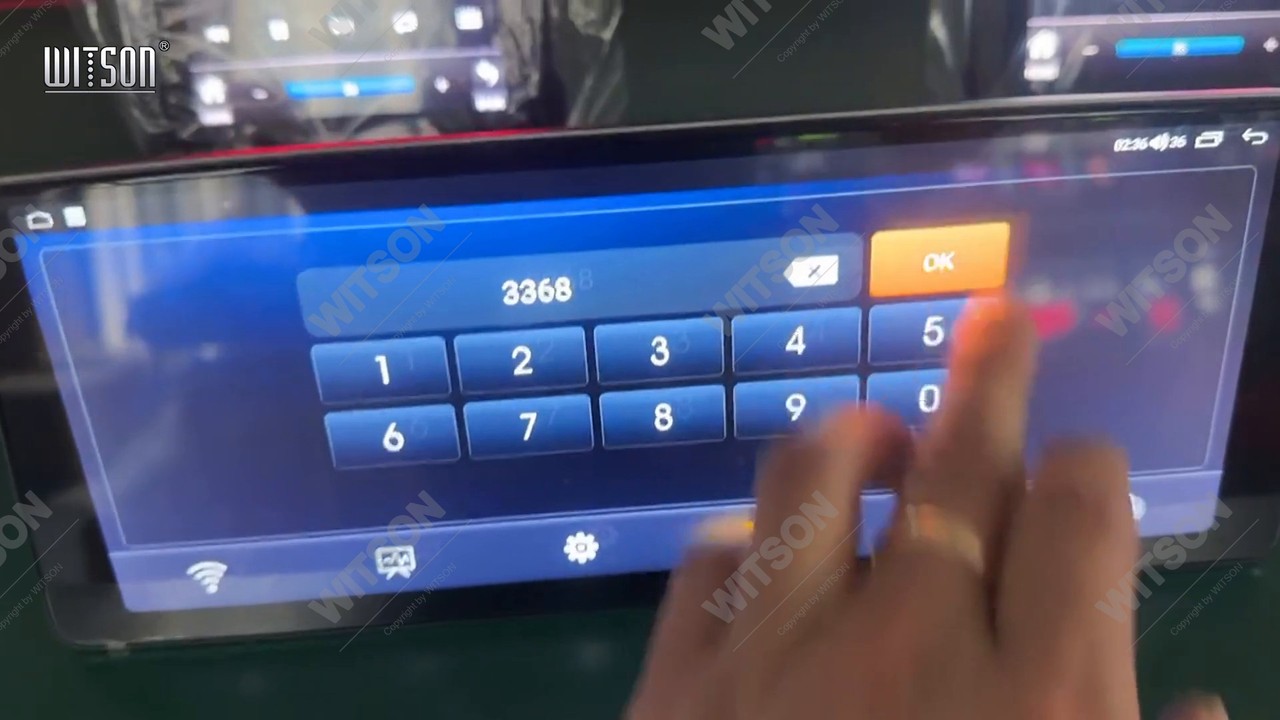
Back in Settings, tap Factory, the fourth entry in the left column. A keypad covers the screen with an entry field at the top, an X to clear it and OK at the right. Enter the factory code and tap OK. If a previous installer changed the code, ask the company that supplied the unit rather than guessing.
The list opens with Original Car Agreement, Car Model and its protocol name, Back MIC switch and 360 switch. On the unit in the clip, Back MIC switch reads Front MIC with the toggle in the white off position - the built-in front panel microphone is in use. Tap once: the row changes to Back MIC with an orange on badge, and audio now comes from the rear microphone input where an external capsule is wired.
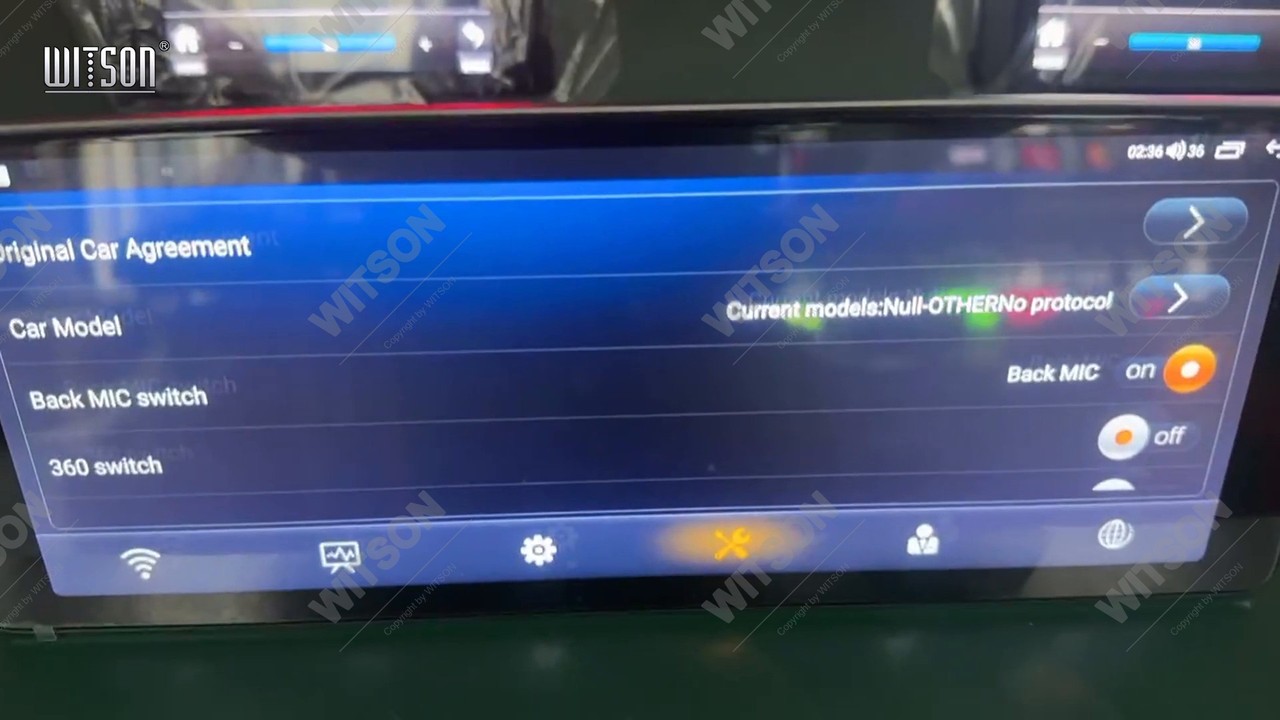
The change is immediate - no reboot - but it only takes effect on the next call. If the car has no external microphone fitted, leave the row on Front MIC: switching to Back MIC with nothing on that input gives the caller silence rather than a better voice. If an external microphone is fitted and the row makes no difference, the fault is on the wire: a plug pushed half way into the adapter behaves exactly like a menu set to the wrong input.
Test with a real call, not with music, and work through the same three steps in the same order each time so results can be compared.
Engine off, car parked. The baseline. Still faint here means the gain is too low; echoing here, with no road noise and no speakers working hard, means it is too high.
Engine running, blower on. Fan noise is the usual reason a good workshop call fails on the road. A roar at the other end means the microphone is hearing the cabin - drop the gain a step.
Volume up, then speak. Echo that appears only as the volume rises is the speaker-to-microphone loop; the cure is the gain, the external microphone position, or both.
Write down the number you end on: a factory reset returns these rows to defaults and brings the complaint back with them.
If the gain has been moved through its whole range and both inputs tried, the remaining causes are physical: a blocked microphone hole behind a screen protector or a dash kit frame, or an external capsule fitted where it picks up reflections. One check belongs to the phone - some phones keep their own microphone active for calls, so if the complaint follows the phone from car to car, the radio is not the cause.
If the sound is fine but the rest of the installation is not behaving, the neighbouring guides cover the usual neighbours of this fault: no sound after installation and the AMP switch, the steering wheel control learning procedure, reversed steering wheel buttons and the reverse camera mirror and format settings. The hardware behind these menus is described in the HB / DHB and HV / DHV platform introduction, the default wording of each page is in the WITSON operation manual download section, and the launcher itself is shown in the DH series interface video.
| What the caller hears | Cause | What to do |
|---|---|---|
| Very faint voice, as if you are across the room | MIC gain set too low for the cabin | Device, Sound, MIC gain, raise the slider one step at a time. |
| Their own voice back, slightly late | MIC gain high enough to hear the door speakers | Lower MIC gain a step or two, then repeat the call test. |
| Whistle that builds up | Feedback loop between speakers and microphone | Lower the gain and the volume; check the external microphone position. |
| Nothing at all after switching to Back MIC | No external microphone wired to the rear input | Set Back MIC switch back to Front MIC, or fit the external capsule. |
| Same faint voice with an external microphone fitted | Back MIC switch still on Front MIC | Factory, Back MIC switch, tap until the row reads Back MIC on. |
| Muffled, as if covered | Microphone hole blocked by a protector or dash kit | Clear the panel hole, then re-test. |
| Complaint returns after a reset | Factory reset returned the audio rows to defaults | Re-check MIC gain and Back MIC switch, then test again. |
In Settings, Device, Sound - the last row of that page, below Speed Compensated Volume. It is not in the Factory menu, and it is easy to miss because the Sound page opens at Keypad Tone and has to be scrolled to the end.
There is no single correct number: it depends on the cabin, the speaker level and whether an external microphone is fitted. The scale runs 1 to 7 and the unit in our clip was delivered at 6 and set to 4. Change one step and judge it on a real call.
Up to a point, yes, and past that point it makes the call worse: the microphone starts to hear the speakers as well as your voice, so the caller gets their own voice back. If a quiet call does not improve after two steps up, the problem is usually microphone position, not level.
That is the default: the row shows which microphone is in use, and with the toggle in the white off position the unit listens to the built-in front panel microphone. Tapping it switches the label to Back MIC with an orange on badge.
They survive a normal reboot and a firmware update. A factory reset returns the audio block to defaults, so both rows come back at factory values - which is why a unit that worked for months can come back sounding faint. Check both rows before assuming the microphone has failed.
Reference
Still faint or echoing after both settings? Send us the vehicle model, the year, and whether an external microphone is fitted.
Ask WITSON SupportMore in the WITSON how-to guides, including the DHV no sound and AMP switch guide.