DHV Series - How-To Guide
A silent new install is usually a switch or a level, not a dead output.
No sound after fitting a DHV unit? The AMP ON/OFF row under Device, Sound decides whether the built-in amplifier drives your speakers, and Volume Balance in the Factory menu sets how loud each source is allowed to play.
0:28 - the AMP ON/OFF row on a bench unit, between Power Conditioning and Noise Reduction. Open the clip on YouTube if the embed is blocked.
Note: As our products are continuously upgraded, the interface on your unit may look slightly different. Please select the corresponding function according to your own model.
Quick answer
If the speakers are wired straight to the unit, open Settings, tap Device, then Sound, and make sure AMP ON/OFF reads ON. Turn it OFF only when a factory amplifier drives the speakers. Then open Factory in the same list and set Volume Balance Settings so the source you are listening to is not left near zero.
A unit that powers up, shows the launcher and takes touches, but stays silent, is almost never a dead audio chip. In the workshop most of these come down to three things, and all three are checkable without opening the dash again.
The internal amplifier is switched off. The DHV firmware carries an AMP ON/OFF row. With it off the unit still runs the radio, the maps and the screen, and sends nothing to the speaker wires - right for a car with a factory amplifier, wrong for a car wired straight to the unit.
The source you are testing is turned down. The Factory menu holds Volume Balance Settings, one level per source. A source near zero is silent while every other source plays, which makes the unit look broken when only one input is quiet.
The amplifier never gets its trigger. A factory amplifier only wakes when the head unit pulls the AMP-CON wire up. A loose or unpopulated pin leaves the radio playing into a sleeping amplifier.
The order below follows that list: levels first, because they are free to check, then the switch, then the wire. If the screen does not answer touches at all, start with the DHV touch screen calibration guide - that is a different fault.
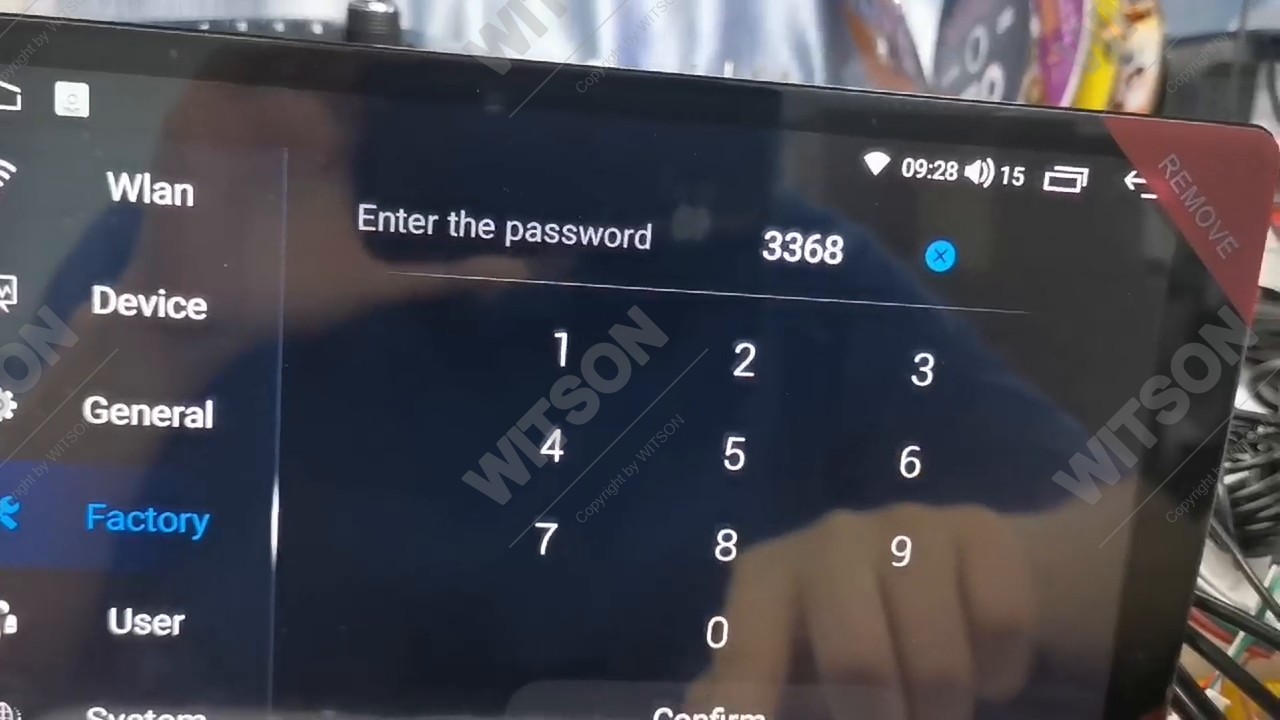
Two of the three checks live behind the Factory password. It is the same door used for the camera format and the panel keys, so if you have opened it before, you already know the way.
From the launcher, open Settings. The left column lists Wlan, Device, General, Factory, User and System. Tap Factory, the fourth entry with the crossed-tools icon.
The keypad appears with Enter the password at the top and Confirm along the bottom. The unit in our clip accepts the factory default code; if a previous installer changed it, ask the company that supplied the unit rather than guessing, because repeated wrong entries on some builds lock the page until the next boot.
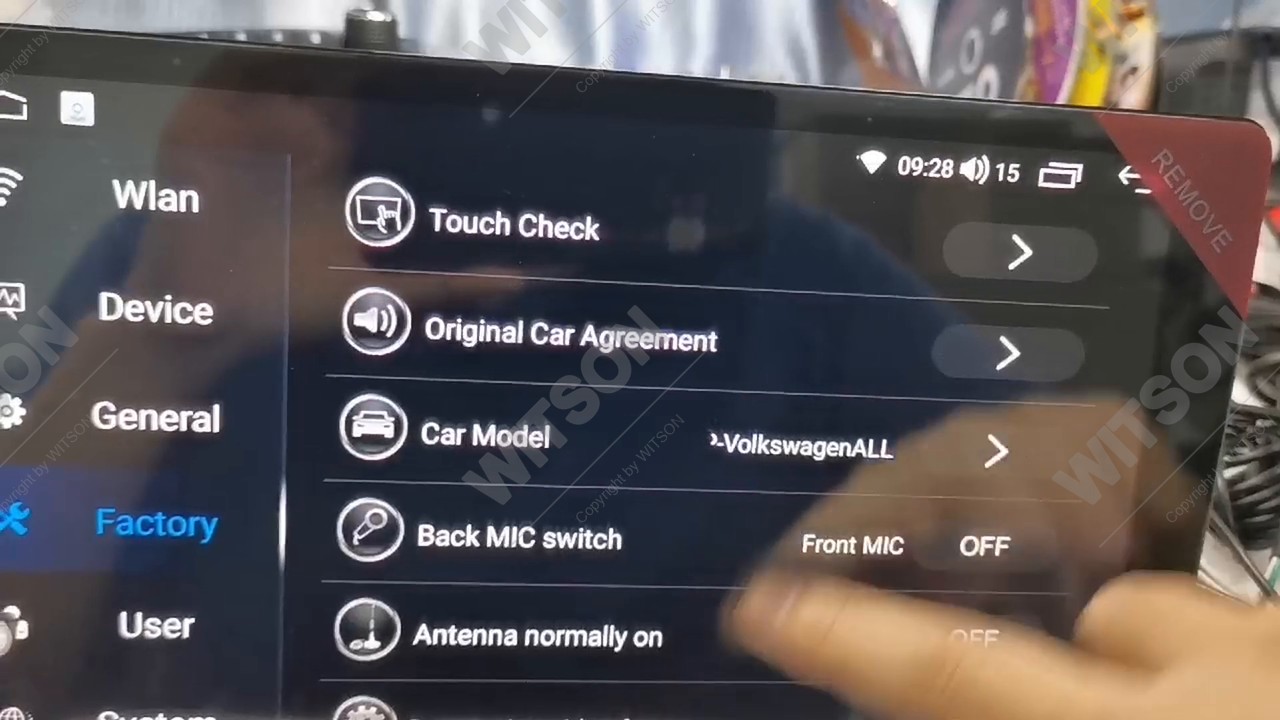
The list opens at Touch Check, Original Car Agreement, Car Model and its protocol name, and Back MIC switch. Keep scrolling past Antenna normally on, reversing video format, Boot Screen Logo, Set Screen, Touch Screen Calibration, Panel Key Learning, Brake wire for video in motion, Front View, Unknown sources and Reverse Power Supply; Volume Balance Settings is second from the bottom on the build in our clip, just above MCU upgrade.
This page is the ceiling for every input. It does not replace the volume knob: it decides how loud each source is allowed to get, so a source sitting at zero stays silent no matter how far you turn the dial up.
Tap Volume Balance Settings and a full-width page opens with eight vertical sliders, each scaled 0 to 10 with 5 in the middle: RADIO, AUX, TV, BT MUSIC, IPOD, NAVI, MUSIC and BTPHONE. On the bench unit in the clip they arrive at 5, 5, 2, 5, 1, 10, 2 and 9 - nowhere near a factory default, because someone has already tuned this unit for a demo.
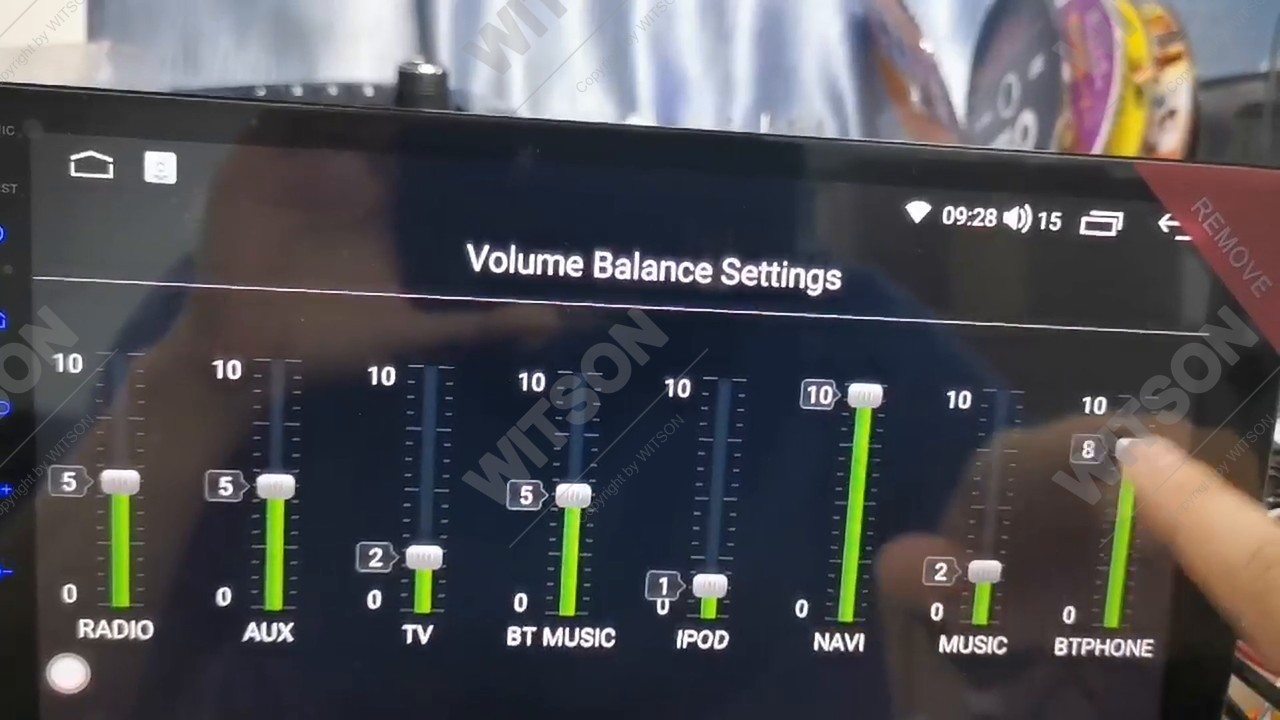
Two practical notes. If the customer says "the radio is fine but Bluetooth calls are quiet", read this page before touching anything else - BTPHONE is a separate level from BT MUSIC. And do not use this page as a volume control: a source dragged to 10 and then turned down with the knob distorts earlier than the others, because you raised the gain before the amplifier instead of after it.
The amplifier switch is not in the Factory list. It sits on the Sound page under Device, next to the tone controls, which is why owners who only look behind the Factory password never find it.
Back in Settings, tap Device, the second entry. The page lists Display, Sound, GPS, Storage, Apps, Input Setting and Output Setting. Tap Sound.
The Sound page reads, from the top: Keypad Tone, LOUD, AMP ON/OFF, Power Conditioning, Noise Reduction, Subwoofer, Equalizer and Speed Compensated Volume. On the bench unit Keypad Tone is on, LOUD is off, and AMP ON/OFF shows green ON.
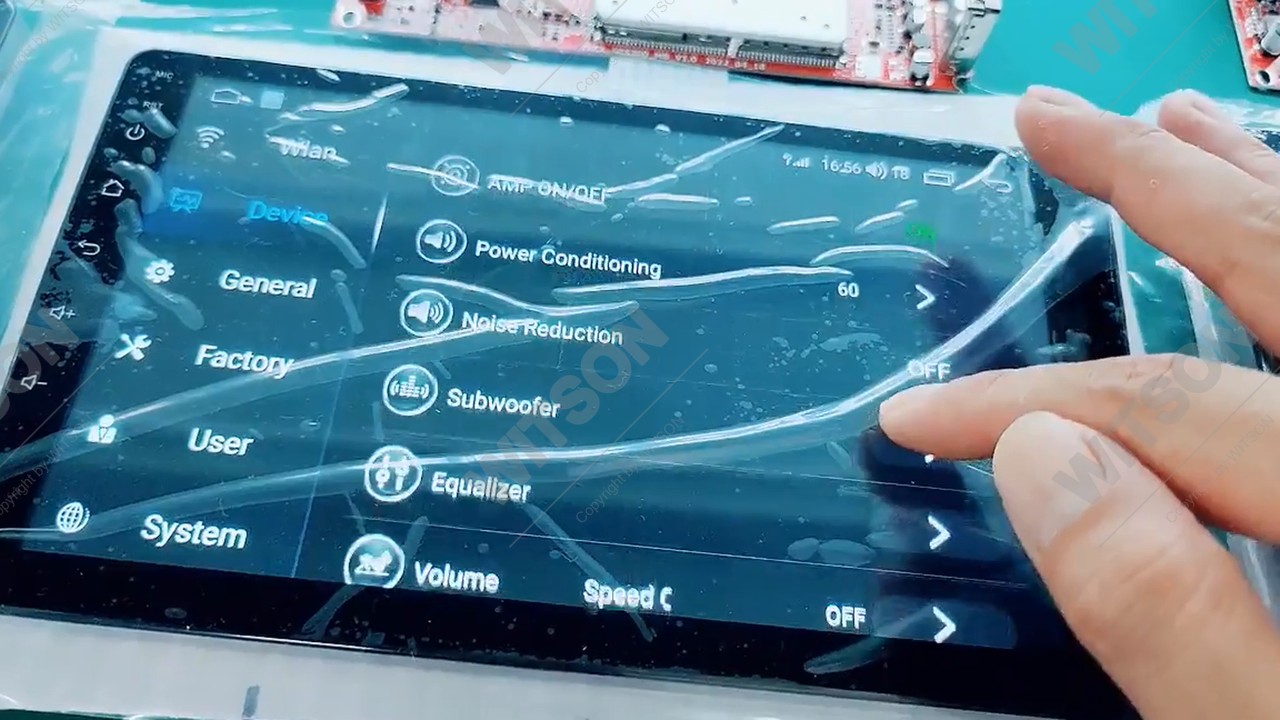
If the speaker wires from the harness go straight to the car speakers, AMP ON/OFF must be ON: that is the unit's own amplifier doing the work. If the car has a factory amplifier fed through the RCA line outputs, set the row to OFF - otherwise the unit drives its own outputs and the amplifier input at once, and the result is distortion rather than volume. A car with the row OFF and speakers wired direct is silent, with no error message on screen.
Power Conditioning sits directly under the switch and holds a two-digit value - 60 on the unit in the clip. Treat it as the last adjustment, after the switch and the source levels are right, and move it in small steps while a familiar track plays.
Subwoofer opens its own page: the bench unit carries Subwoofer volume at 10, Subwoofer low frequency at 20 Hz and Subwoofer high frequency at 250 Hz. The last two matter more than the volume - a subwoofer played outside its range sounds like a blown speaker rather than a quiet one. With no subwoofer in the car, this page changes nothing.
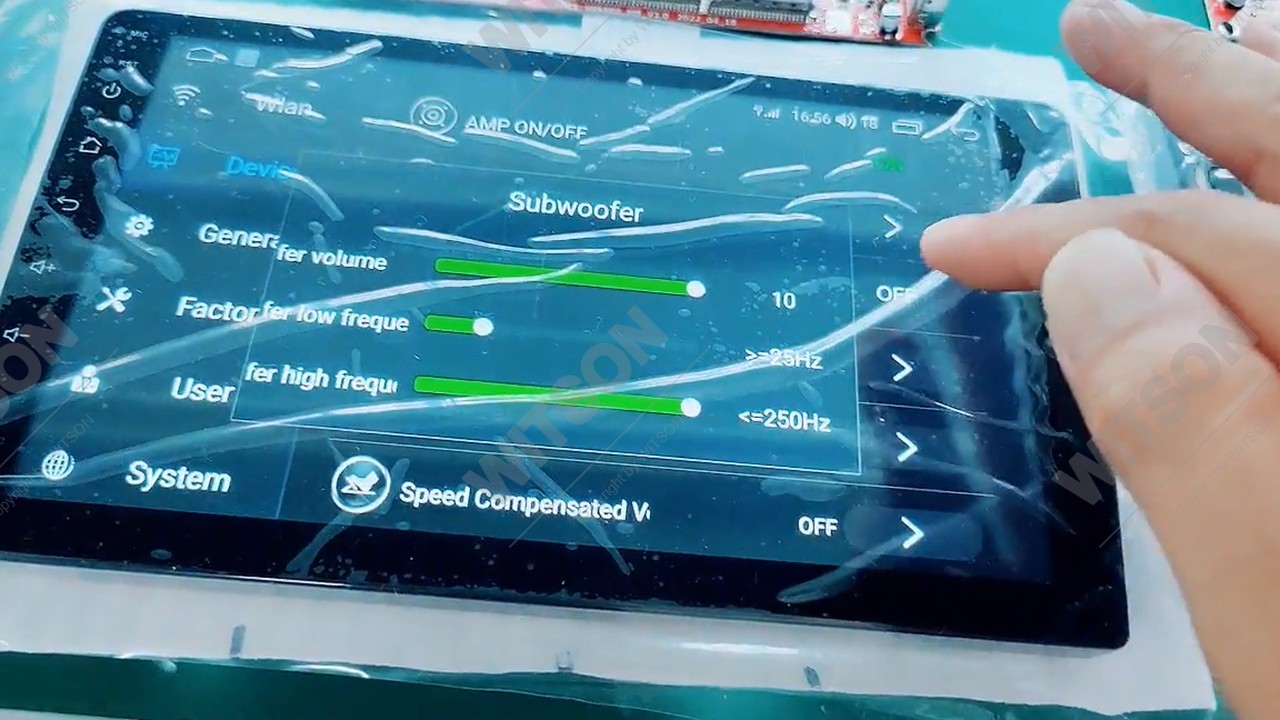
Most cars that arrive with a factory amplifier and a premium speaker package keep their amplifier, and the new head unit becomes a source for it rather than a replacement for it. That amplifier is asleep until something tells it the radio is on, and on these harnesses the wire that tells it is tagged AMP-CON - literally "amplifier control".
On the WITSON harness the tag is printed on the wire itself, next to the RCA cluster: AMP-CON above the Chinese words for amplifier control wire. Follow it back into the adapter for the car and confirm the pin is populated and seated. The same cluster carries SUBWOOFER OUT, AV IN and CVBS IN, which is a useful landmark - if you are looking at the RCA plugs, the AMP-CON wire is the one hanging beside them.
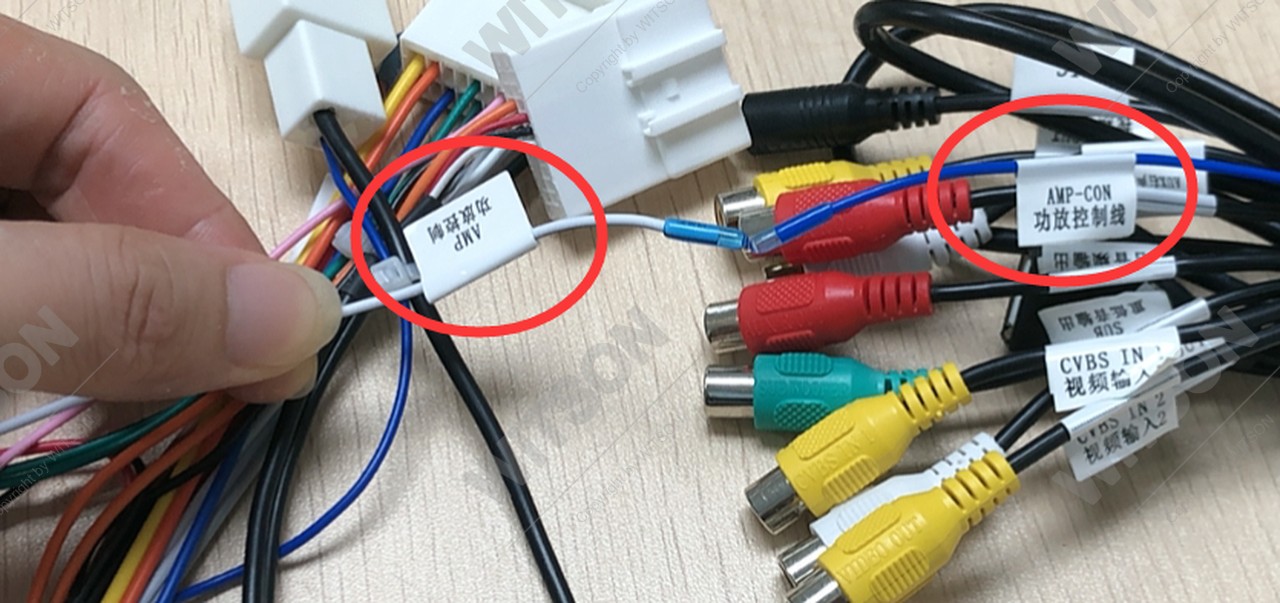
Two symptoms point at this wire rather than at a menu: a car that plays nothing on every source with AMP ON/OFF already OFF and the levels correct, and a faint click or pop from the speakers at boot followed by silence - the amplifier is woken for an instant and then loses its trigger. Both are wiring, not firmware.
Do not bridge AMP-CON to a permanent live to "test" it. The wire is a signal, and a permanent feed keeps the factory amplifier awake with the car parked - a flat battery a day later.
Test in the order the signal travels: one source at a comfortable level, then the switch, then the wire. Listen before changing anything, at volume 15 - the level the bench unit shows in the clip - because "no sound" and "very quiet sound" are different faults with different answers.
Then switch the ignition off for ten seconds and back on. The AMP switch and the Volume Balance levels survive a normal reboot and a normal firmware update, but a factory reset returns them to defaults - which is why a unit that worked for months can come back silent after a reset. Check the AMP row before taking the dash apart.
If the sound is back but the steering wheel keys are not, that is a different page on the same unit: the SWC learning procedure covers keys that do nothing, and the reversed steering wheel button guide covers keys that work backwards. If the picture rather than the sound is missing, start with the reverse camera guide. For the hardware behind these menus, the HB / DHB and HV / DHV platform introduction lists what each variant is built on, the default menu wording is in the WITSON operation manual download section, and the launcher itself is shown in the DH series interface video.
| Symptom | Cause | What to do |
|---|---|---|
| Nothing on any source, speakers wired straight to the unit | AMP ON/OFF left at OFF | Device, Sound, set AMP ON/OFF to ON. |
| Nothing on any source, car has a factory amplifier | AMP-CON trigger not connected | Check the AMP-CON pin in the harness adapter. |
| One input is silent, the rest are fine | That source's Volume Balance level is near zero | Factory, Volume Balance Settings, raise that slider. |
| Radio loud, Bluetooth calls faint | BTPHONE and BT MUSIC are separate levels | Volume Balance Settings, raise BTPHONE on its own. |
| Sound arrives late, with a click then silence | Amplifier woken briefly, then losing its trigger | Re-seat AMP-CON; check the amplifier fuse as well. |
| Distorted at low volume | Unit driving its own outputs into an amplifier input | Device, Sound, set AMP ON/OFF to OFF on that car. |
| Subwoofer quiet or badly out of range | Low and high frequency limits set for another driver | Factory audio page, Subwoofer, set the limits for this driver. |
| Silent again after a factory reset | Reset returned AMP and the levels to defaults | Re-check the AMP row, then Volume Balance. |
Then the fault is behind the switch, not in it. Check the source level in Volume Balance Settings first, then the speaker wiring - a harness with the speaker pins in the wrong order plays nothing on any channel. If the car has a factory amplifier, the AMP-CON wire is the next candidate rather than the menus.
OFF, when the factory amplifier drives the speakers and the harness feeds it from the RCA line outputs. ON is for the case where the unit's own outputs go straight to the speakers. The two are not interchangeable: the wrong one gives either silence or distortion that sounds like a failing speaker.
Because each source has its own ceiling in Volume Balance Settings, and one of them has been left low - IPOD at 1 and BTPHONE at 9 on the bench unit in our clip are a page tuned for a demo rather than for a car. Open Factory, then Volume Balance Settings, and lift the source that is quiet.
They survive a normal reboot and a normal firmware update. A factory reset returns the audio block to its defaults, so AMP ON/OFF, the Volume Balance levels and the subwoofer limits all come back at factory values. Re-check them after any reset before assuming the amplifier has failed.
On the WITSON harness it is a single wire with its own printed tag, grouped with the RCA plugs at the SUBWOOFER OUT end of the loom. Trace it into the car-specific adapter and confirm the pin is populated. If the adapter has no matching pin, the head unit cannot switch that amplifier on at all, and that needs a different adapter rather than another menu setting.
Reference
Still silent with AMP on and the levels correct? Send us the vehicle model, the year and a photo of the harness tags around the RCA cluster.
Ask WITSON SupportMore in the WITSON how-to guides, including the DHV touch screen calibration guide and the DHV SWC learning procedure.