
Car screens - GPS reception
A customer sent me a photo last spring that said more than his email did. His car sat in a car park, the map arrow drifting a street to the left, and above the windscreen a pair of steel crossbars he'd fitted for a canoe. Where the rack ends, the arrow behaves. Under it, it wanders. "Only there," he wrote. That word's the whole diagnosis, and you can chase it in twenty minutes with nothing but the screen on your dash.
Get the scale straight first. The signal reaching your roof arrives around minus 130 dBm, roughly nineteen decibels below the thermal noise floor in its own two-megahertz slot. It's buried under that noise, and your receiver digs it out because the spreading code buys back some forty-three decibels. There's nothing spare in that chain, which is why a piece of steel in the wrong place shows up where a Wi-Fi dropout would not.
Two things, and neither is what people expect. The first is plain shadowing. Your receiver wants satellites spread across the sky, not just overhead. A fix needs geometry: four bunched in one patch give you a position, but a loose one that drifts. Shallow satellites low on the horizon pin it down, and those are exactly the ones a bar across the roof removes: a path from twenty degrees above the horizon runs almost flat across your roof line.
The second is reflection. Metal doesn't absorb much at this frequency; it bounces. A crossbar, a roof box, a ladder: each sends a copy of the signal to your antenna a few nanoseconds late, and your receiver may lock onto it. At nineteen centimetres wavelength, a bar a few centimetres wide isn't a wall. It's a scatterer, and scattering is worse than blocking: the signal keeps arriving while the truth gets muddled.
Here's the useful part, and it saves an annoying afternoon. A roof box or a loaded rack changes your sky view a lot; bare crossbars change it a little. I've seen placement matter more than the rack. On most retrofit installs it's a small puck at the base of the windscreen, under the roof lining's front edge, or behind the dash trim. Push a rack above that spot and you've put steel in the first metre of a path that was already grazing the roof.
Do this before you spend a cent, and do it in the same place twice so the comparison means something. Open sky, engine running, nothing charging. You'll need a satellite page: the unit's own app, or a free one on a phone held next to the screen.
Now read your numbers. Four satellites is a three-dimensional fix; eight to twelve is normal for a healthy install. If reception recovers the moment the antenna clears the bar, you've got your answer; if it stays poor with the rack off, the rack turns out not to be the cause, and section three's yours.
Three things on the cable side account for most weak-signal complaints I see that have nothing to do with the sky.
An active antenna carries a small amplifier and needs DC up the coax, typically 2.7 to 5.5 volts. No bias, and it's a dead amplifier.
A cross-threaded SMA, or a Fakra that clicks but isn't seated, costs you decibels silently. Nothing looks wrong from outside.
A ceramic patch needs metal under it to work as designed. A bare patch on plastic trim loses the gain the datasheet promised.
Start at the back of your unit, because that's where hands have been. On most aftermarket units it's a small gold SMA socket with a thin grey lead. It should seat by hand and stop cleanly; if it spins, the thread's gone and the pin may not be touching. European-built cars often use a blue Fakra plug instead, keyed one way, and a half-pushed Fakra is the quietest, most frustrating failure here.
Then ask whether the unit feeds that antenna at all. That's the awkward part when a kit's been mixed and matched: a passive puck from an old install, a unit expecting an active one, or the reverse. If probing a live connector makes you uneasy, don't. Ask the supplier what the unit expects and match your antenna to it.
Then the run itself. Every metre of thin coax costs signal at 1.6 GHz, and a long extension coiled behind the trim is a common shortcut that eats the margin, so if someone added two metres to reach a puck on the roof, that's the usual suspect. Check the ground too: a patch wants a continuous metal plane, which is why a magnetic puck on a steel roof beats the same patch taped to plastic. The puck's got its own ground plane, which is most of why it works up there.
When I photograph a weak install for my own notes, these are the three frames: shadow, housing, connection. Between them they explain most of what a rack does to a retrofit car screen.
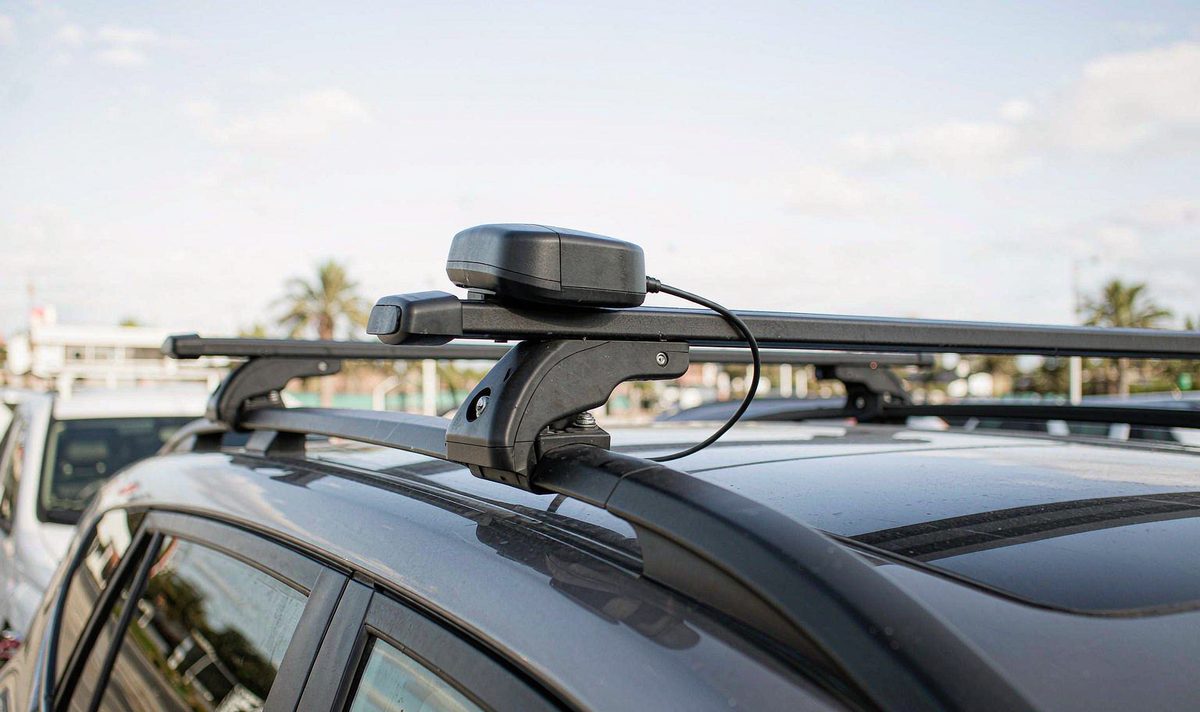
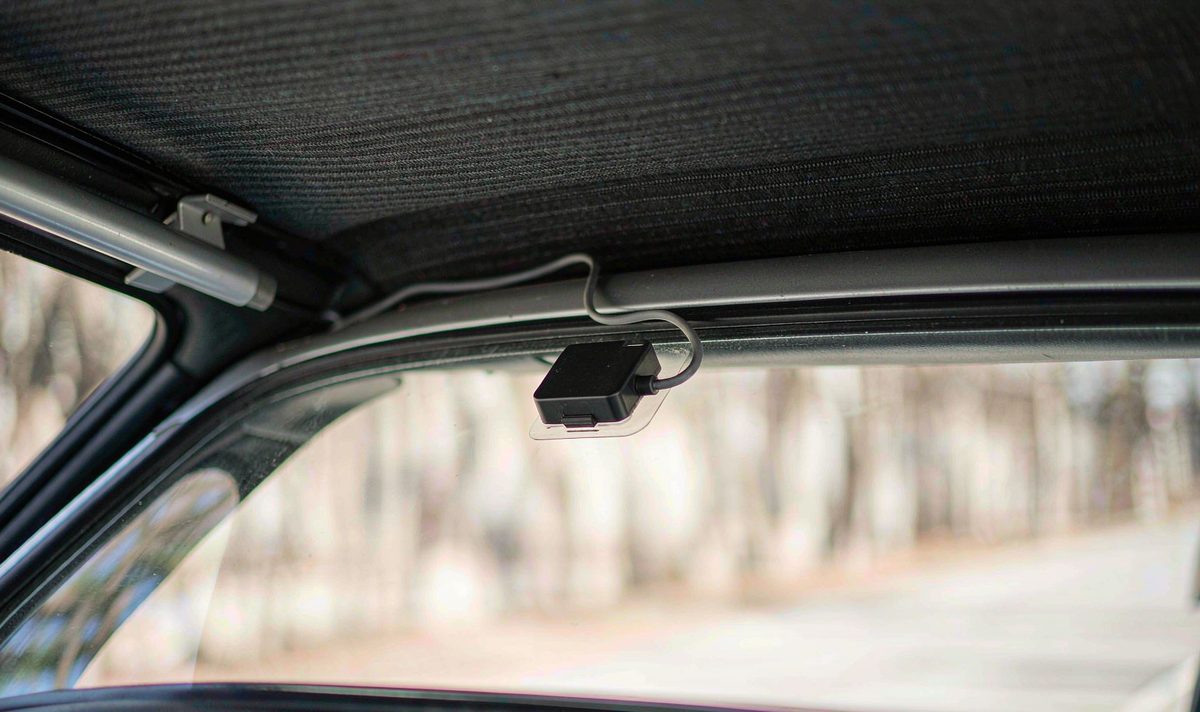
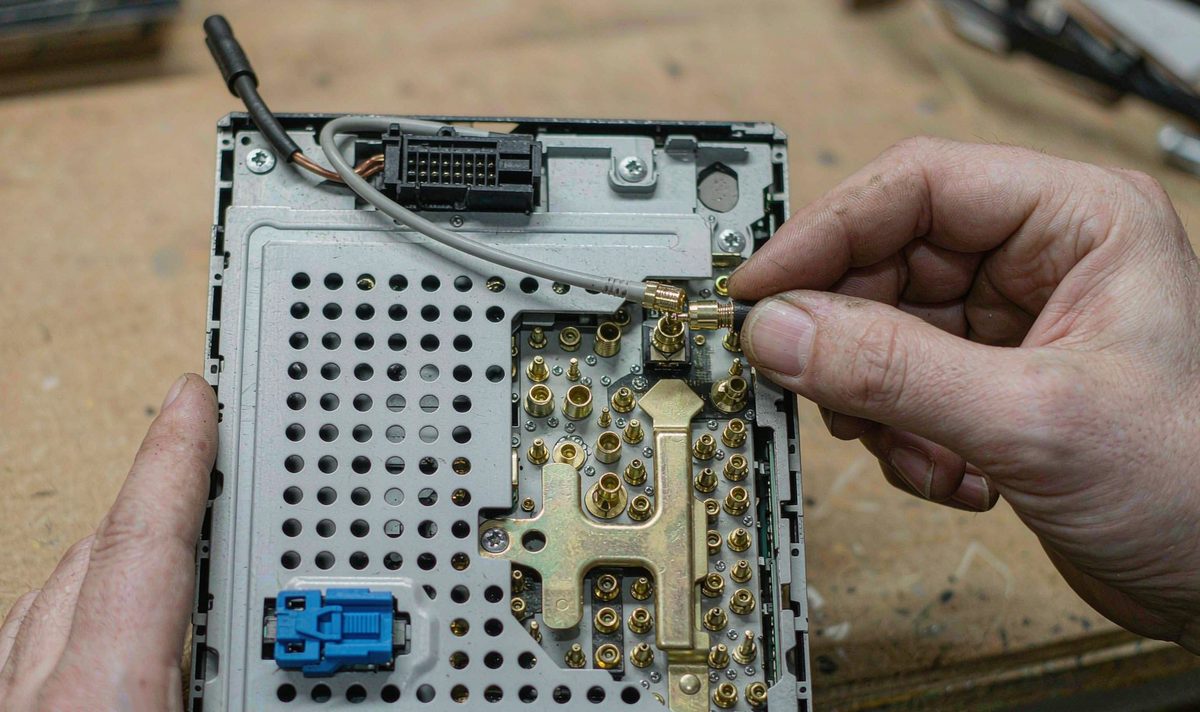
Same three failure points anywhere: steel in the path, a housing that blocks the sky, a connection that looks made but isn't.
The gain figure on the box is measured on a reference ground plane, in open sky, at band centre. It'll tell you nothing about your rack, your roof box, your heated windscreen or the ladder you leave on all summer.
It also promises nothing about your car. A patch tuned for one mounting surface behaves differently on another, and a coated or heated windscreen can cost you more than any crossbar. Treat the printed number as a starting condition and let your own satellite count decide.
If the numbers recover with the rack off, you've found it; if not, the antenna or the receiver's the limit, and only a few variables matter.
| Variable | What it does | How you notice it |
|---|---|---|
| Patch size | A bigger ceramic holds a wider band and a better low-angle pattern | Few satellites, fix slow to settle |
| LNA gain | Lifts the signal before cable loss; 20 to 30 dB is the usual band | Fine at the unit, poor at the end of a long lead |
| Constellations | Multi-GNSS tracks GPS, GLONASS, Galileo and BeiDou together | Count well under ten in the open |
| Mounting surface | Sets the ground plane and the metal in the path | Reception changes when the puck moves ten centimetres |
| Neighbours | Switching supplies and 2.4 GHz radios raise the noise floor | Signal drops when a charger or camera is plugged in |
Read the last row first: it's free, and the count tells you what the menu won't. A cheap USB charger, a dash camera on the same trim, a hotspot in the console: any can lift the noise floor enough to cost you satellites, and unplugging one takes a minute. I've found installs come right with nothing but a different charger.
The satellite count's the other clue. A unit seeing one constellation struggles on a tree-lined street where a multi-GNSS receiver holds a fix. That's also where a properly configured android head unit CAN bus decoder box earns its keep: its wheel-speed signal carries the map through a tunnel instead of freezing.
The common mistake is buying an antenna first; only now is a purchase sensible, and only if the free tests pointed at hardware, because for most people reading this with a rack on the roof the answer's placement rather than a new antenna: get the puck out from under the bars, keep it on metal, keep the lead short. That's a Saturday morning and no invoice, which is the least painful outcome here.
If you do need a different antenna, buy for your run and your mount, not the biggest number on the box. A magnetic puck with its own ground plane suits a roof or boot lid; a glass-mount patch suits a car where nothing can go outside; a bare patch needs the metal it was designed around. Ask what bias voltage the unit supplies and match the antenna to it; more gain won't lift a path that steel is blocking. Same question applies to any retrofit android head unit for older car build, where the boxed antenna's the smallest part of the kit and the easiest to mis-mount.
The other half is patience with the map. If reception is clean and the arrow still jumps, that's software, and the settings behind android car radio navigation while driving are worth a look before hardware changes hands. If a replacement is genuinely on the table, start with the universal one and two DIN range for a standard cage. WITSON builds retrofit screens for a long list of vehicles, and when a customer sends a photo of a rack over a windscreen we ask for the satellite page before we talk parts.
Tell us the car, the year and where the antenna sits now, and we'll tell you whether the unit in your dash is the part limiting reception.
Tell us your car, we will check what fitsIt depends what the rack's been doing. Bare crossbars mostly cost you the low satellites, so reception improves rather than transforms; a roof box or a loaded rack blocks a large part of the sky and the change is obvious. Run the test with your bars off and compare counts. If the count barely moves, the rack was a coincidence, and the antenna or its feed is where I'd look next.
You can, and it beats leaving it under the bars, provided the puck sits on a metal plate and not on a plastic bar. Keep it clear of the bar's shadow and of anything electrical up there.
Some do, and it's worth ruling out before you blame the rack. Metallic coatings and fine heating elements attenuate the signal, so a glass-mounted antenna behind one works through a lossy layer every second. Hold the antenna outside the glass for two minutes and compare the count. If it jumps, mount it outside the cabin or accept a slower fix.
Buildings and reflections, not the rack. A rack adds one obstruction you can see and move; a street canyon adds many you can't.
